
What’s new - Version 1.6
August 10, 2023 6:00 AM (EDT) → 8:00 AM
👥 GP Portal now available!
A dedicated login for Vector’s clients to access key fund data in a new seamless dashboard experience
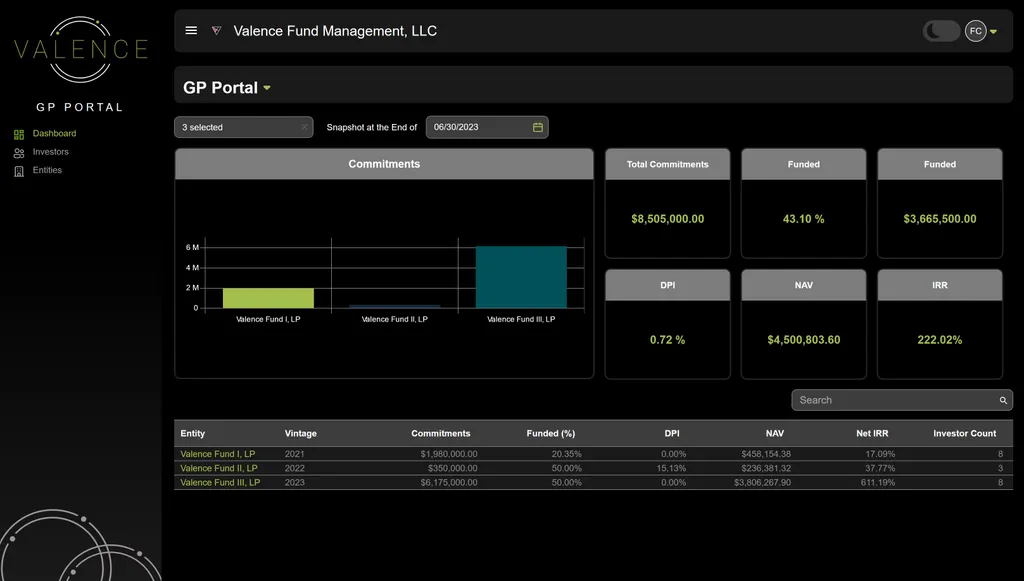
External View - GP Dashboard
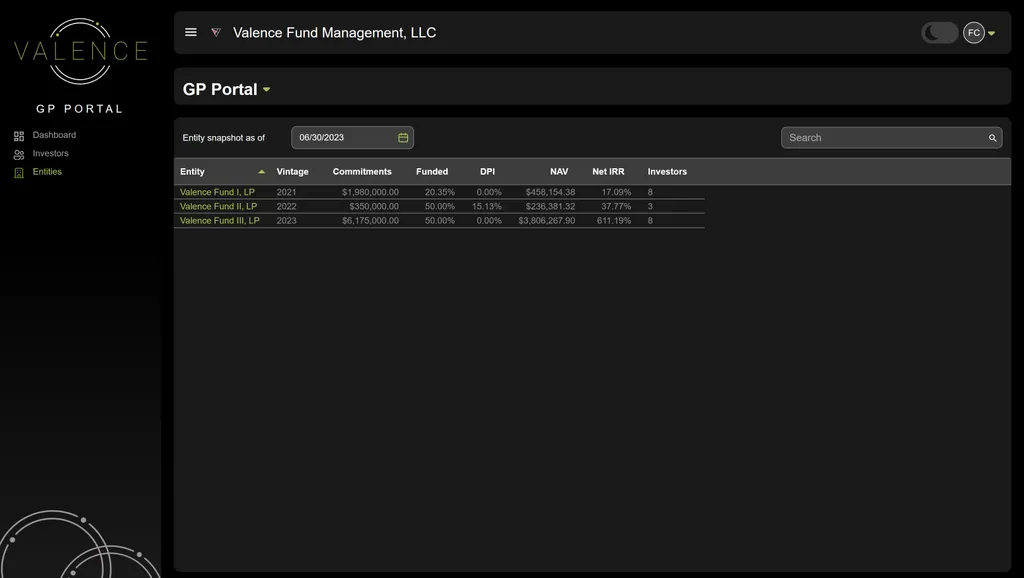
External View - GP Entity Dashboard
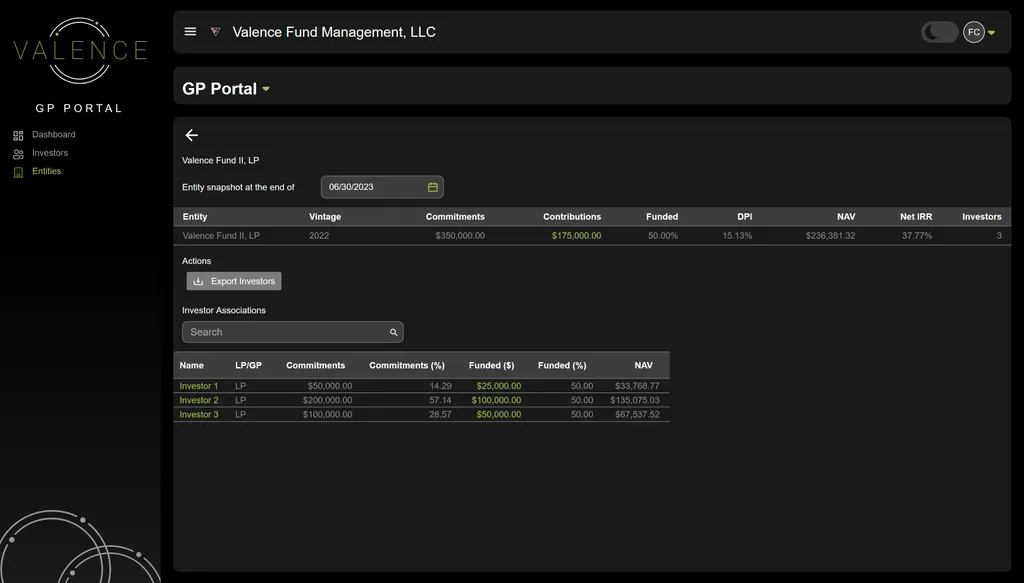
External View - GP Entity Snapshot
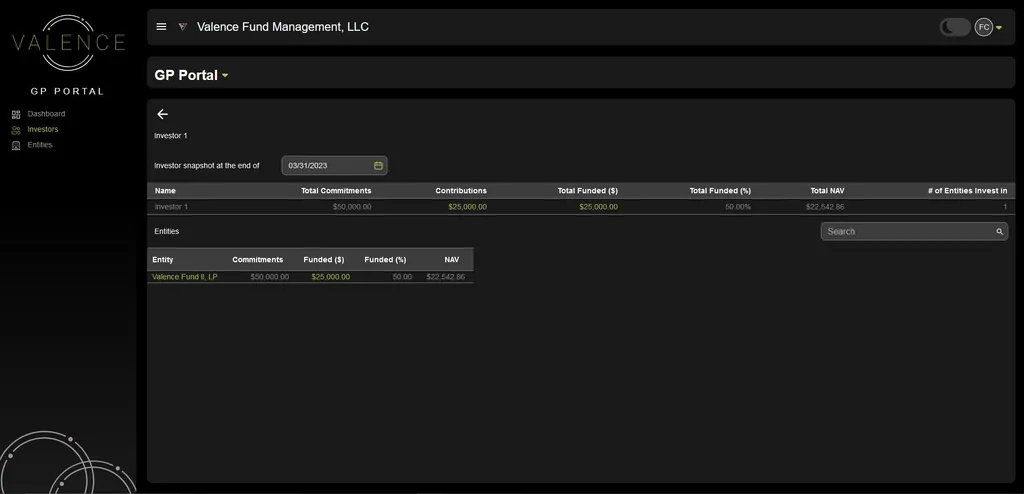
External View - GP - Investor Snapshot
What’s new?
Empowering Dashboard: A dynamic new dashboard that offers a comprehensive view of crucial fund metrics spanning single or multiple entities for Vector’s clients
Visual Insights at Your Fingertips: Instant access to vital data: From Commitments and % Funded to Amount Funded, DPI, NAV, and IRR.
Tailor Your View: Customize your data showcase by selecting and manipulating entities—reveal insights for a specific fund or multiple funds at once.
Investor Visibility: Gain deeper insights by viewing investor commitments alongside key fund metrics within each fund.
Entity Exploration: Delve into entity details managed by the Vector team: Uncover Names, Vintage, Commitments, Contributions, Funded, DPI, NAV, Net IRR, and Investor Count.
Historical Perspective: Manipulate the Snapshot Date to see fund statistics aligned with specific reporting periods.
Investor Intel: Explore investor-related details within each entity, including Names, Commitments, Commitment %, Funded Amounts, Funded Percentages, and NAV.
How do I access?
Connect with Your Vector Team: Your dedicated Vector team will be reaching out to determine appropriate contacts to be provisioned access. Data will be current through the latest reporting period.
Seamless Dual Role Access: For those who are both a GP and an LP in another Vector-managed fund, enjoy a unified login, ensuring a seamless journey.
Aesthetic Freedom: Toggle effortlessly between light mode and dark mode to suit your preferred user experience.
🔐 Enhanced Investor Portal
Revamped interface & visuals - Enhanced access to fund metrics for investors
What’s new?
Streamlined Investor Experience: Investor Contacts now wield the power to select investors and entities, offering a personalized journey. For contacts connected to multiple Vector clients and/or Entities, a single login grants access to all associated funds.
Commitments at a Glance: Investors receive an instant overview of commitments, featuring % funded and remaining across singular entities or multiple entities.
Seamless Key Metric Access: Dive into essential fund metrics such as NAV and Distributions.
Tailored Visual Control: Investor Contacts gain the ability to drive visuals through precise investor and entity selections. By selecting a Vector Client and then selecting or multi-selecting entities in which they are associated with, a new streamlined view of:
Capital Calls
Instant Capital Call Insight: Effortlessly access the latest capital call details, replacing the need for PDFs. Quick insights include Issue Date, % of Capital Committed, Cash Contribution, Due Date, and Wire Instructions.
Historical Capital Call Access: Easily explore historical capital call data for individual or multiple entities, encompassing Entity, Investor Name, Due Date, Amount Called, and % Called.
Capital Account Statements:
Snapshot of Financial Position: Investors can now instantly grasp their Capital Account Balance in relation to the latest reporting period.
Distributions:
Clear Distribution Overview: Dive into the Distribution table showcasing Entity, Investor, Distribution Date, and Amount Distributed.
Latest Distribution Snapshot: Gain insights into the most recent distribution postings, including Total Cash Distribution Amount, Date, Investors' Share, and Description of Distribution.
Personalized User Experience: Investors can toggle between Light Mode and Dark Mode for a customized experience that persists across subsequent logins.
How do I access?
No Action Needed: If you already have access to the Valence Investor Portal as an investor, this functionality is now available.
Seamless Dual Role Access: For those who investors in multiple Vector-managed funds, enjoy a unified login, ensuring a seamless journey.
Aesthetic Freedom: Toggle effortlessly between light mode and dark mode to suit your preferred user experience.
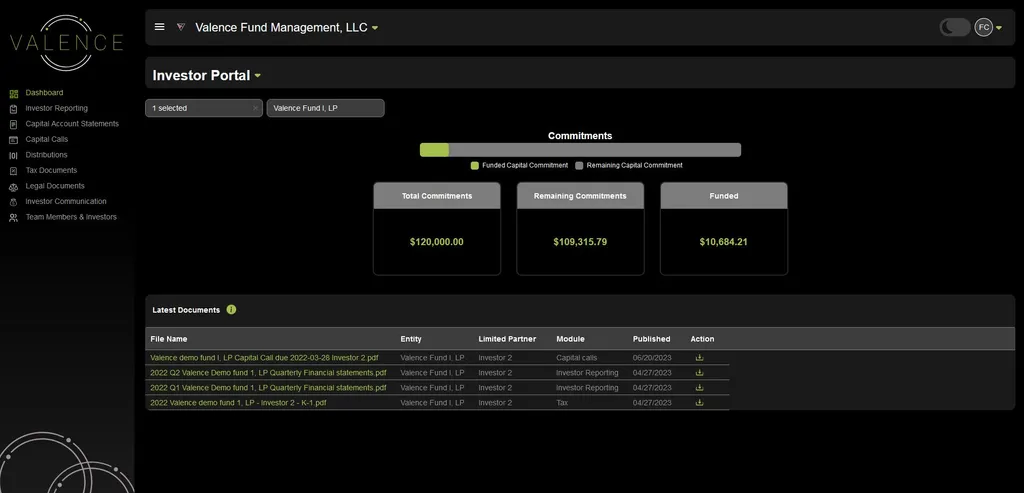
External View - Investor Portal Dashboard - NAV and Distribution excluded
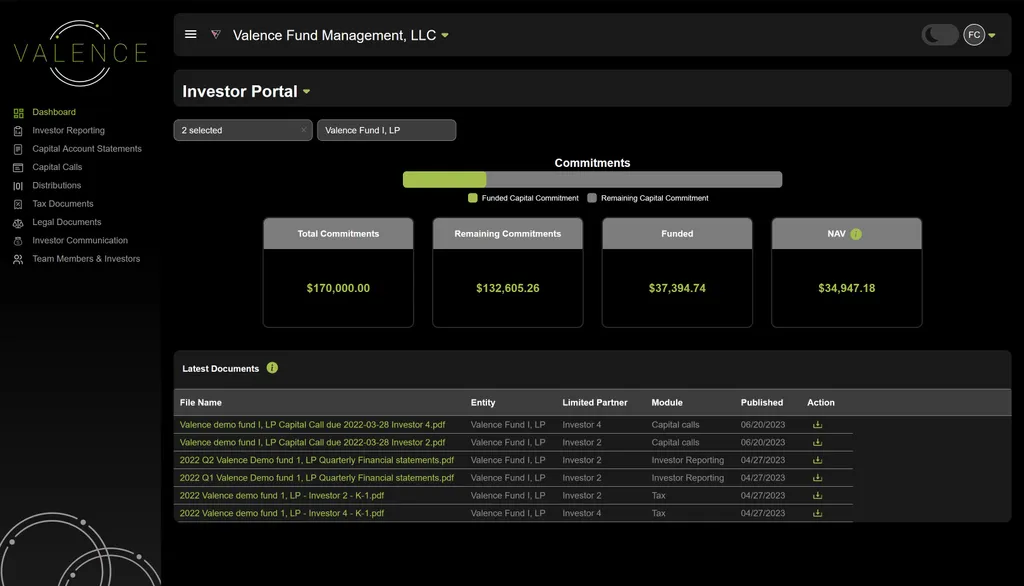
External View - Investor Portal Dashboard - NAV included
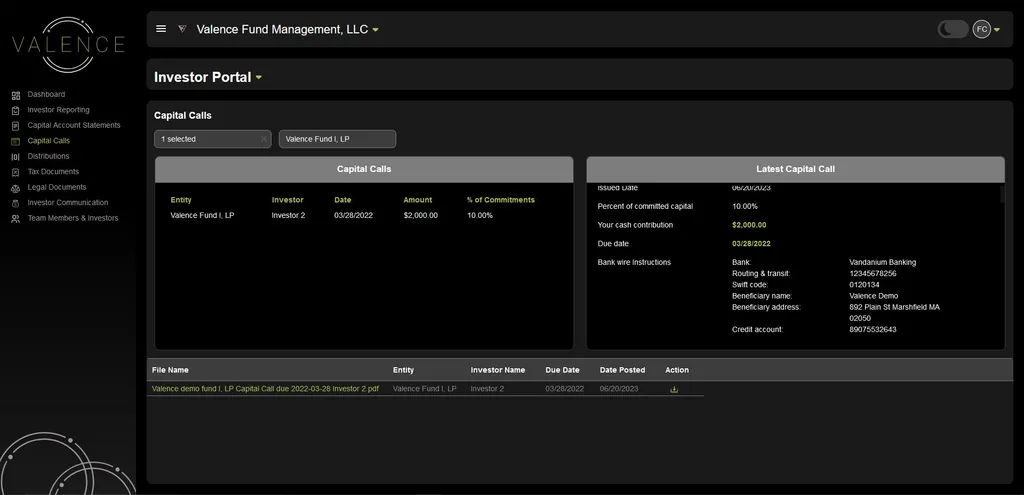
External View - Investor Portal - Capital Call Visuals
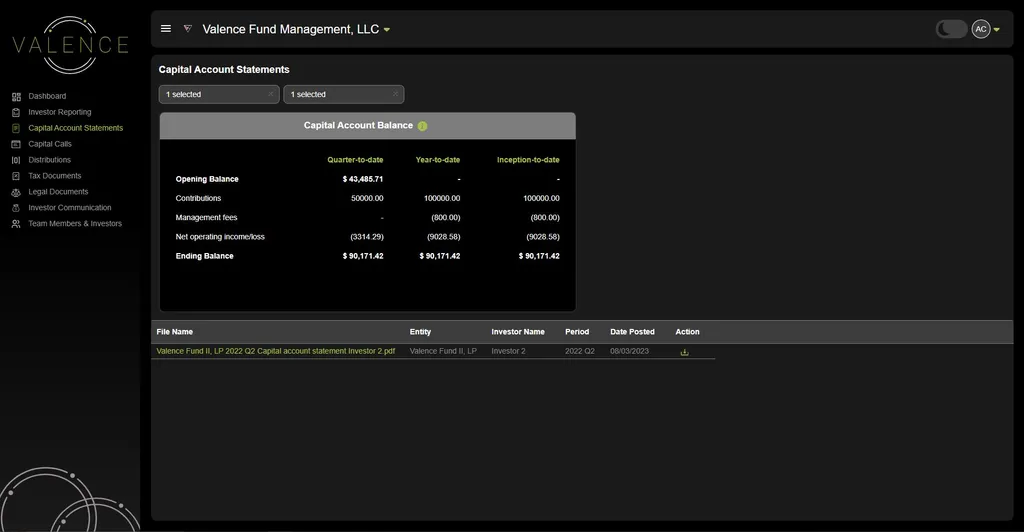
External View - Investor Portal - Capital Account Statement Visual
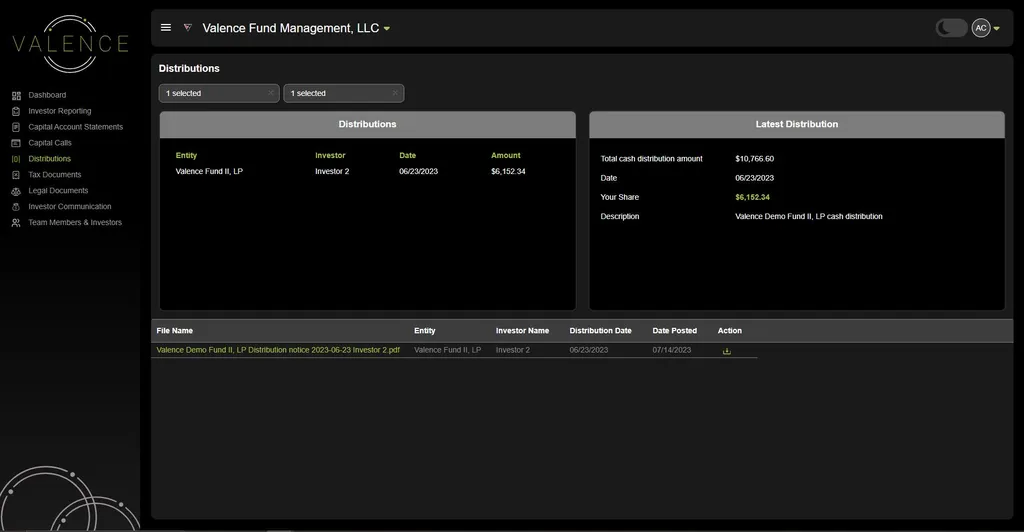
External View - Investor Portal - Distribution visuals
👩🏫Formatting Updates & Bug Fixes
Content Enhancement: Refinements in content accuracy and formatting.
User-Friendly Interface: Improved page layout and pagination indicators for smoother browsing.
Clearer Messaging: Enhanced inactivity message for better user guidance.
Naming Clarity: Simplified names for sections to aid navigation.
Bug Resolution: Rectified issues related to token verbiage, error messages, and document downloads for a seamless experience.